How To Publish Your Vacation Rental On Google Vacation Finder Via HomeToGo

Quick Answer For Hosts: If you manage properties using Smoobu and are already listed on HomeToGo, your properties are automatically forwarded to Google Vacation Finder. Ensure your Smoobu channel connection is active via API so your data syncs automatically to benefit from the dedicated commission structure.
Getting your properties in front of as many potential guests as possible is the foundation of a successful business. Today, one of the most powerful and visible ways to capture attention is directly through Google. But understanding how to get your properties to appear in Google's dedicated travel search can sometimes feel overwhelming.
The great news is that if you use Smoobu and HomeToGo, the entire process is automated for you. We prioritize making complex tasks easy to handle, empowering you to streamline your workflows and increase your bookings effortlessly. Here is everything you need to know to expand your global reach with Google Vacation Finder.
What Is Google Vacation Finder?
Google Vacation Finder, frequently referred to by guests as Google Vacation Rentals, is a specialized search experience built directly into the main Google search engine. When travelers look for places to stay in a specific city or region, Google displays an interactive map and a curated list of available properties right at the top of the search results.
Unlike traditional Search Engine Optimization, which requires you to build an extensive website and compete for page-one rankings against massive corporations, Google Vacation Finder bypasses the standard text links. Instead, it pulls your property photos, live availability, and nightly rates directly into the search interface. This allows guests to find and explore your property exactly when they have the highest intent to book their trip.
Note: Connecting to Google Vacation Finder via HomeToGo is different from the Google Vacation Rentals feature, in which hosts receive bookings directly on their personal websites. Keep in mind that other booking portals, such as Booking.com and Expedia, may also distribute your listings on Google.
Why List Your Properties On Google?
Increasing your visibility on the world's most popular search engine offers incredible benefits for hosts.
- The massive reach is unmatched. Google is the starting point for the vast majority of travel planning globally. Displaying your properties here puts you in front of millions of highly motivated travelers before they even click through to a traditional booking channel.
- It builds immense trust and reliability. Guests intrinsically trust Google. Having your property appear on their polished, official interface instantly lends credibility to your business.
- Thanks to the technical integrations we provide, achieving this visibility requires absolutely zero extra effort on your part. Efficiency is at the core of our offering, allowing you to scale your business without adding hours of manual work to your week.
The Multi-Channel Strategy: Single Site vs. Broad Distribution
Many hosts begin their journey by listing their property on a single platform, such as Airbnb or Vrbo. While this approach is simple initially, relying on just one site is a significant risk for growing your business. Algorithm changes, local market shifts, or sudden platform policy updates can instantly decrease your visibility and decimate your calendar.
Listing on multiple platforms, such as Airbnb, Booking.com, and HomeToGo, protects your margins and cultivates a sustainable, multichannel enterprise. By diversifying your online presence, you act as your own digital travel agent, constantly sourcing leads from across the internet. Different channels also attract different types of guests. While one platform might attract guests looking for quick, short-lead-time trips, platforms like HomeToGo often attract high-value guests booking family trips months in advance.
Connecting your property to Google Vacation Finder via HomeToGo is the ultimate extension of this multichannel strategy. It places your listing directly in front of travelers before they even choose a booking channel. While managing multiple channels might sound complicated, a channel manager synchronizes your availability, rates, and bookings in real time to prevent double bookings entirely.
How The Smoobu And HomeToGo Connection Works
HomeToGo is one of the premier global booking platforms and metasearch engines. Because HomeToGo is an officially trusted partner of Google, it automatically syndicates its hosts' available inventory directly to Google Vacation Finder. Please note: it is not possible to exclude a listing; all listings on HomeToGo are automatically distributed.
Smoobu serves as your reliable central hub, enabling this seamless synchronization. As an advanced channel manager, Smoobu ensures that your calendar availability, pricing, and minimum length of stay are perfectly aligned across the internet.
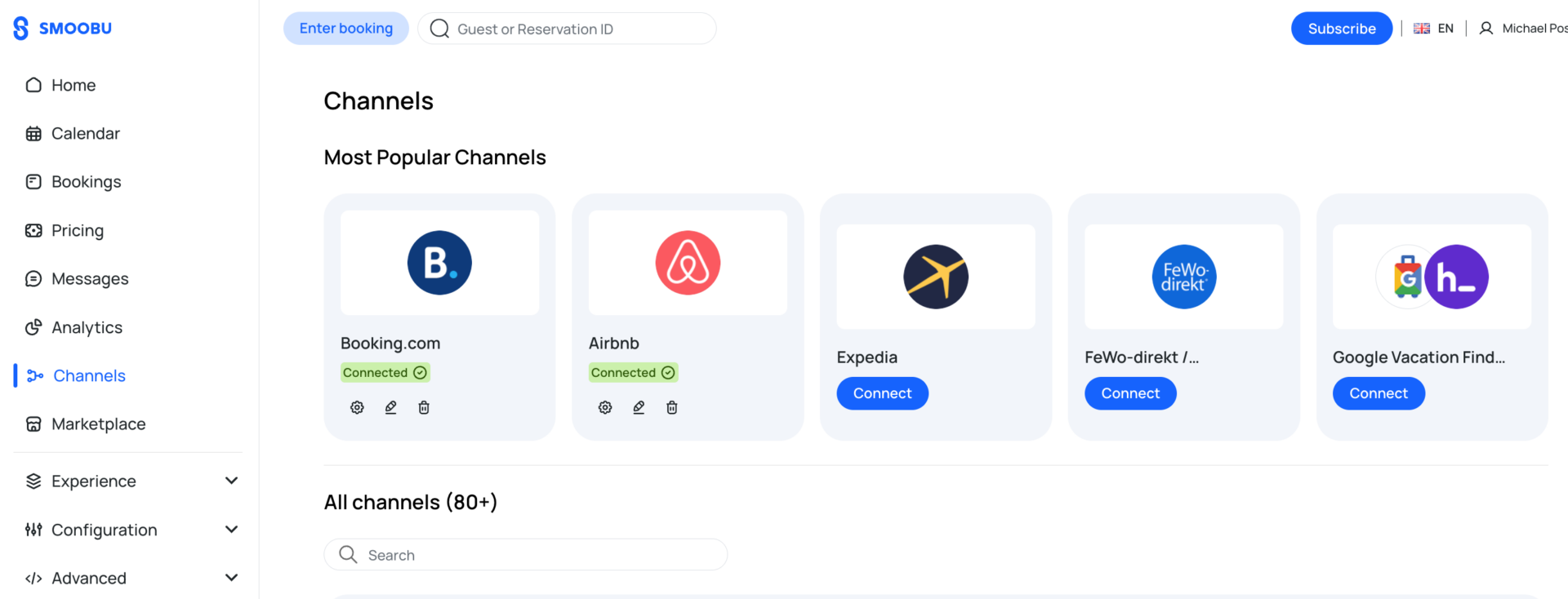
When you connect HomeToGo to Smoobu, your data flows from your dashboard to HomeToGo, and then HomeToGo pushes that accurate data directly to Google. In Smoobu, navigating this is easier than ever: Channels is now a top-level menu item and is no longer located under Settings. On the Channels page, the HomeToGo portal displays the Google Travel icon right alongside HomeToGo.
Eligibility Requirements
Before proceeding, please note the following prerequisites for this connection:
- You must be listed on HomeToGo.
- Hosts in certain countries (e.g., France, Austria, Australia) cannot list on HomeToGo and are therefore ineligible.
- While it is technically possible for U.S. hosts to list on HomeToGo via HTG US, HTG US cannot be connected to Smoobu.
Step-By-Step Guide To Getting Listed
If you meet the eligibility requirements, follow these simple steps to ensure everything is connected properly:
- Create your listing on HomeToGo and select the Flex model.
- Wait for your HomeToGo listing to be verified.
- Once your listing is verified, log in to Smoobu and go to Channels.
- At the top of the page, click Connect under Google Vacation Finder/HomeToGo (which will appear in your Most Popular Channels list). Follow the subsequent steps on screen.
Once your properties are connected via the API, they will automatically be forwarded to Google's travel search ecosystem. It typically takes a few days for your listings to appear in Google search results, as this timeline is entirely controlled by Google. You will not see Google Vacation Finder mentioned in your personal myHTG interface.
Best Practices For Google Vacation Finder Success
While the connection process is automatic, the way your property appears on Google is entirely up to you. To maximize your bookings, ensure your listing is optimized to capture a guest's attention.
Start by uploading high-resolution photos. Google searchers are highly visual, and the main photo is often the deciding factor in whether a guest clicks on your listing. Ensure your spaces are well-lit and clearly represent the experience you offer.
Next, keep your calendar meticulously updated. Because Smoobu syncs your data in real time, any blocked period you enter will immediately be reflected on Google, preventing overbooking and frustrating guest experiences.
Finally, be completely transparent about your amenities and pricing. Clarity about what your property offers is crucial to securing confident, happy guests.
Frequently Asked Questions
Do I need to pay an extra fee to be on Google Vacation Finder?
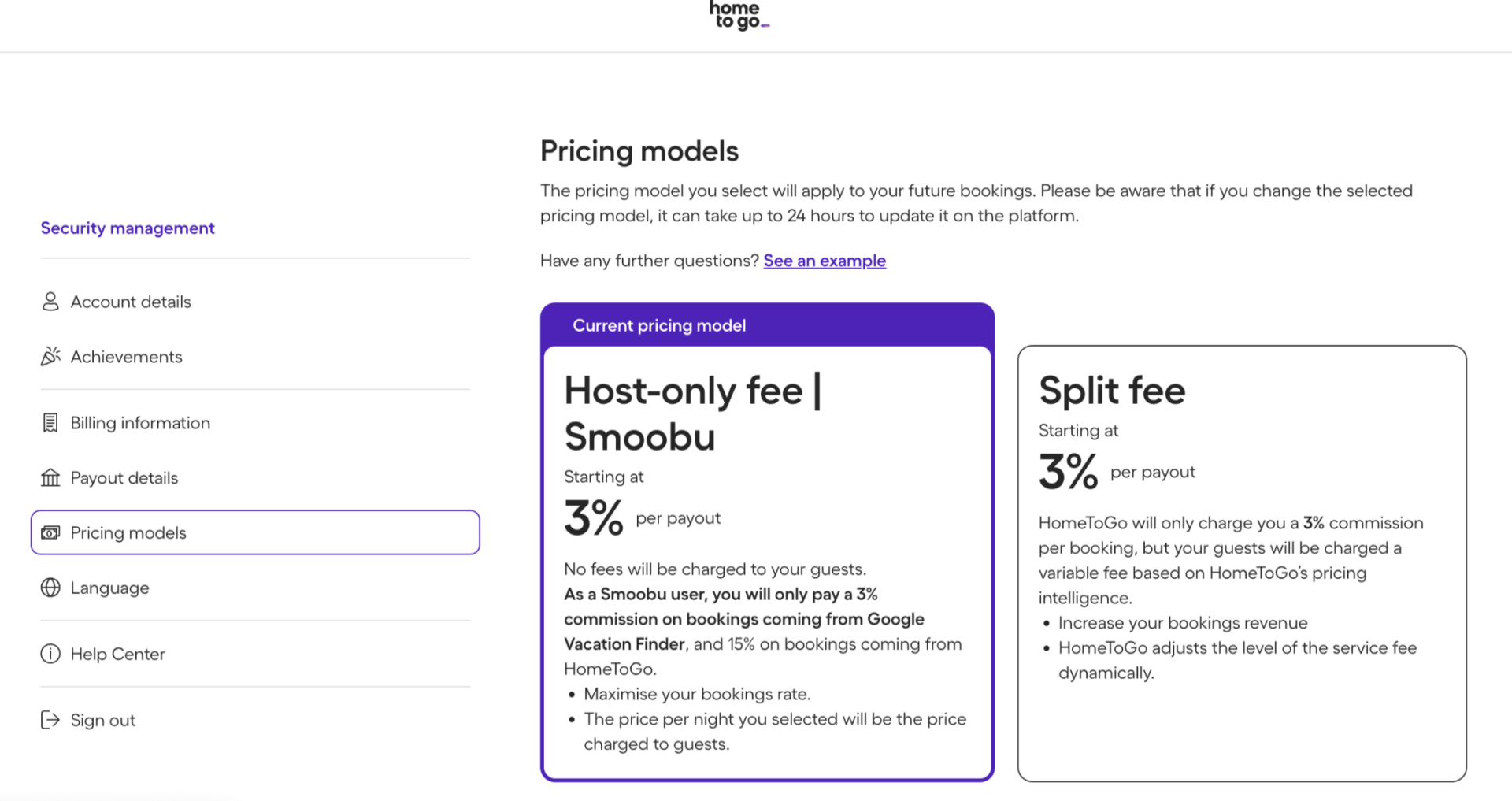
There are no additional fees from Google or Smoobu, but your bookings are subject to HomeToGo's commission structure. To benefit from the special commission structure, HomeToGo must be connected to Smoobu via API.
Learn more about our transparent pricing models.
- Host-only commission structure on HomeToGo: You are automatically switched to a Host-only fee. HomeToGo bookings from Google Vacation Finder will incur a 3% commission, while all other HomeToGo bookings (not from GVF) will incur a 15% commission.
- Split-fee commission structure on HomeToGo: Your commission structure remains unchanged.
Will my calendar sync automatically?
Yes. Smoobu's software automatically updates your availability across all connected channels, protecting you from double bookings and saving you valuable time.
Can I connect multiple properties at once?
Yes. Whether you are managing one property or fifty, you can use the add property feature within Smoobu to map all your listings to HomeToGo simultaneously.
If I am already connected to Smoobu, do I need to take action?
No. Hosts currently connected to Smoobu do not need to take any action, as your listings are already being automatically distributed.