Airbnb’s New Guest Rules From November 20: How to Update Your Check-in Messages and Forms

Starting November 20, 2026, Airbnb will impose stricter limits on what hosts can ask guests. Airbnb's policy on host-imposed contracts and reasonable house rules affects contracts, data requests, door codes behind an app, checkout chores, and fines.
If you send these through automated messages, a one-size-fits-all workflow no longer works for Airbnb guests. Our overview of Airbnb’s off-platform policy explains the rules; this checklist shows how to adjust your automated check-in, step by step.
Key Takeaways:
- The rules apply to Airbnb reservations booked on or after November 20, 2026. Bookings made earlier follow the previous policy. These Airbnb policies don't cover
- Booking.com, Vrbo, or direct bookings, so you can keep your current flow there and give Airbnb guests their own version.
- Collect only the guest data a law or documented building rule requires, and state that in your listing before guests book.
What Changes for Airbnb Bookings From November 20
Two Airbnb community policies take effect for reservations booked from that date. One limits contracts and data requests; the other defines what counts as a reasonable house rule. Together they touch almost every automated check-in message hosts commonly send.
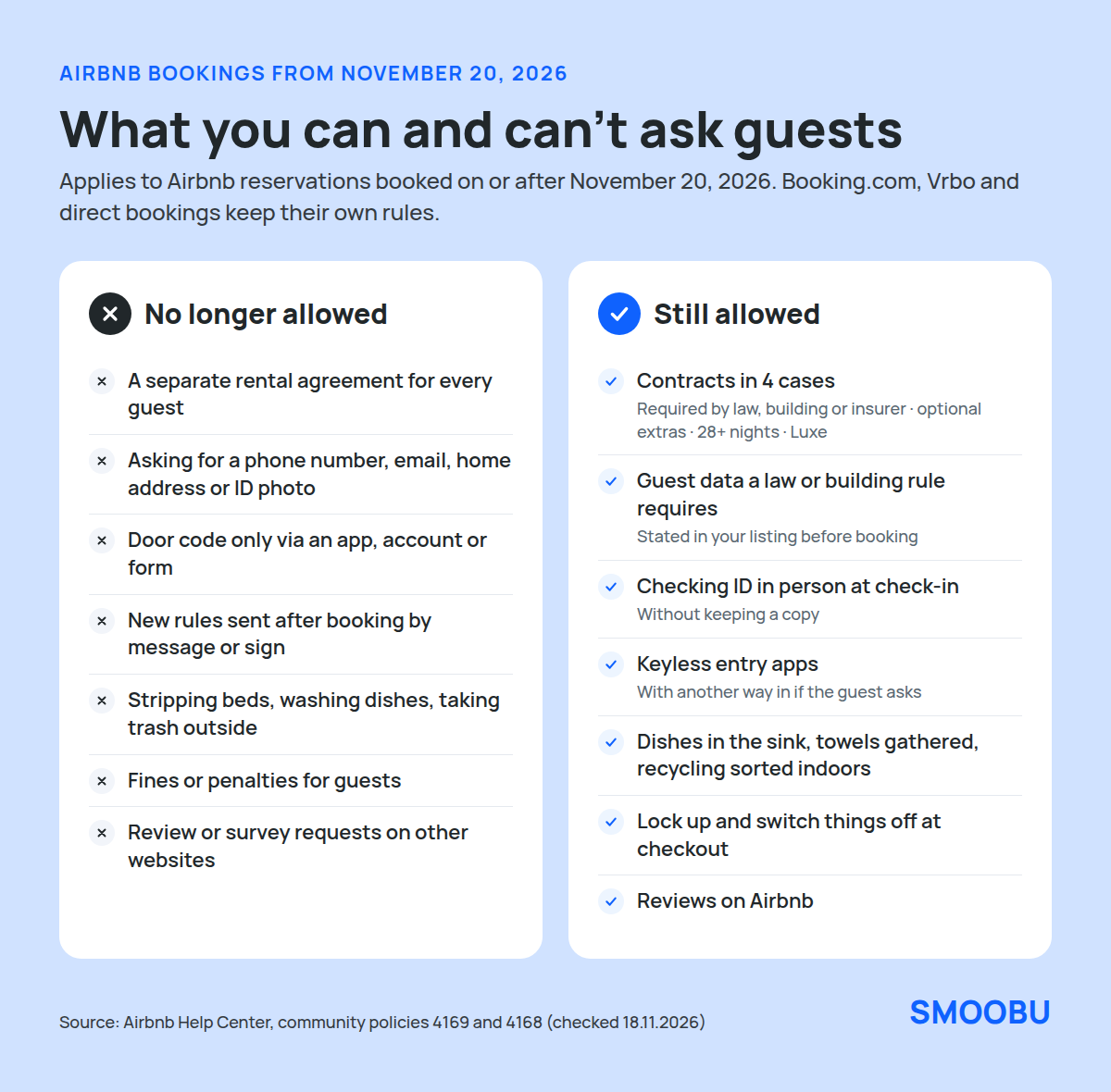
| Area | No longer allowed for Airbnb guests | Still allowed |
|---|---|---|
| Contracts | A separate rental agreement for every guest | Contracts required by law, your building or community association, or your insurer; optional extras; stays of 28 nights or more; Luxe listings. Terms must be shown in the listing |
| Guest data | Asking for phone, email, home address, ID photos or documents | Data that a law or documented building rule requires, disclosed in the listing’s additional rules; checking ID in person without keeping a copy |
| Entry | Making guests install an app or register to get in | Keyless apps, if you offer another way in when a guest asks; optional apps and guides |
| House rules | New rules sent after booking, heavy chores, fines | Reasonable rules shown in the listing before booking, such as putting dishes in the sink |
| Reviews | Asking for a review or survey on another website | Reviews on Airbnb |
The house rules policy names the chores that go too far: stripping beds, taking trash off-site, and washing and putting away dishes. Asking guests to gather used towels or sort recycling into indoor bins is still fine, as Airbnb explains in its guide to house-rules changes.
Fines and penalties are generally out too. For damage, Airbnb points hosts to AirCover and the Resolution Center, as described in its pricing and payment transparency policy.
Your Check-in Checklist: What to Remove From Airbnb Messages and Forms
Open every template that reaches Airbnb guests, from the booking confirmation to the post-stay message, and check it against these six points.
- Rental agreements: remove contract links unless one of Airbnb’s exceptions applies. If so, include the terms in the listing’s designated contracts section before booking.
- Personal data: remove requests for a personal email, phone number, home address, or a photo of an ID, unless a law or documented building rule requires them.
- Door codes: don’t make the code depend on an app, an account, or a completed form. If you use a keyless app that needs registration, offer another way in when the guest asks.
- New rules: don’t introduce rules by message or sign that aren’t in your listing. Repeating a rule the listing already shows is fine.
- Checkout chores and fines: remove bed stripping, dishwashing, taking out the trash, and any penalty for skipping a task.
- Review requests: remove links to Google reviews or external surveys from Airbnb messages.
If a law requires guest registration where your property is, say so in your listing’s additional rules in one or two sentences: what you collect and why. Airbnb asks for that before guests book, so it feels routine, not surprising.
How to Set This Up in Smoobu
You don’t have to give up automation. In Smoobu, every message template has a scope, so you can send one version to Airbnb guests while keeping your current version for other channels. Here is how to do it with Smoobu automated guest communication.
1. Split Your Templates by Channel
Go to Experience > Communication and open a template, such as your check-in instructions. Under Scope, set Channels to every channel except Airbnb, then save.
Create a copy for Airbnb only and edit it against the checklist above. The help center explains the scope settings in Set up automated messages to your guests.
Messages to Airbnb guests travel through Airbnb’s own messaging, as How messaging works with Airbnb and Booking.com explains, so write the Airbnb versions in plain text.
2. Decide Whether Airbnb Guests Get the Check-in Form
Smoobu’s online check-in form is account-wide: the same fields apply to every booking, as Set up online check-in for your guests describes.
If a law requires guest registration for your property, you can keep sending the link to Airbnb guests, as long as the form asks only for the fields that the law requires.
If no law requires registration, leave the [onlineCheckInLink] placeholder out of your Airbnb templates. Booking.com, Vrbo, and direct guests can keep receiving it through their own templates.
3. Send Door Codes Without a Condition
Many hosts send the door code after guests complete online check-in. For Airbnb guests, send it at a fixed time with your arrival message instead, so entry never depends on filling out a form. Your other channels can keep the current trigger.
4. Clean Up Checkout and Post-Stay Messages
Rewrite the Airbnb checkout message so it only repeats reasonable rules from your listing, such as locking up and turning off the heating. Keep review reminders pointing to Airbnb.
The Smoobu digital Guest Guide can still explain your listing’s rules, as long as using it stays optional and it doesn’t add new ones.
Make the same wording changes in your Airbnb listing first, then copy them into your templates. When the listing and your messages say the same thing, guests know what to expect, and you won't have anything to correct later.
With the Smoobu Airbnb Channel Manager, Airbnb messages arrive in the same inbox as your other channels, so you can check the new versions as guests reply.
What Stays the Same for Booking.com, Vrbo, and Direct Bookings
These policies are Airbnb’s, so they apply to Airbnb reservations. Guests from other channels and your own website will continue to receive your existing templates, check-in form, and contracts under each channel’s rules and the law.
Many hosts still use the change as a reason to slim down their data requests everywhere. Asking only for what you need, and saying why, is good practice under data protection law and makes check-in quicker for every guest.
Frequently Asked Questions
For the full background on the house rules, contracts, and phone number changes, see our overview of Airbnb’s fall 2026 changes.
Only when a law or documented building rule requires it, and you must state this in your listing’s additional rules before booking. You may check an ID in person at check-in if the listing says so, but you may not keep a copy unless an exception applies.
No. Airbnb applies the updated policies to reservations booked on or after November 20, 2026. Reservations booked earlier fall under the previous policy.
Airbnb reviews listings from November 20 and contacts hosts whose rules need changing, with at least 20 days to update or appeal. If a violation persists, Airbnb can show a notice on the listing, reduce its visibility in search, or take other action.
Summary: Keep Your Automation, Adjust It for Airbnb
Starting November 20, Airbnb guests should get a check-in without extra contracts, data requests, entry conditions, chores, or fines. Splitting your Smoobu templates by channel lets you make that change for Airbnb in one sitting while keeping every other channel's current flow.
New to Smoobu? Start your 14-day free Smoobu trial today.
