
Your vacation rental analytics only pay off when they lead to a decision.
Once a month, check five things in Smoobu Analytics (occupancy, revenue per night, length of stay, channel mix, and cancellations) and make one decision on each: your prices, your minimum stays, where you sell, your cancellation policy, and which property needs work next.
Each decision is small on its own. The value is in the knock-on effect: a better price this month means a stronger listing next month, and a better stay today means a better review that keeps working for you.
If you want a refresher on what each number means first, read our guide to the most important statistics for vacation rental hosts.
In this guide:
- Why a Monthly Review Works Better Than Daily or Yearly Checks
- What Smoobu Analytics Shows You
- The 5 Monthly Decisions and What They Pay Off
- What a Year of Monthly Decisions Adds Up To
- Common Mistakes When Reading Your Numbers
- How to Run Your Monthly Review in Smoobu
- Frequently Asked Questions
Why a Monthly Review Works Better Than Daily or Yearly Checks
Checking your numbers every day mostly shows noise: one cancellation or one late booking can make a good week look bad. Checking once a year shows the pattern, but too late to change anything about the year it describes.
A month is long enough to show a real trend and short enough to act on it. A decision you make in March can still shape your bookings for May, June, and the summer.
Twelve reviews a year also give you twelve chances to adjust, instead of one big guess in January.
Here's how the five decisions connect to what you gain later:
| Monthly decision | Knock-on effect | Payoff over the following months |
|---|---|---|
| Adjust prices for busy and quiet periods | Fewer underpriced peak nights, fewer empty quiet nights | More revenue from the same calendar |
| Set minimum stays and stay discounts | Fewer turnovers and fewer gap nights | Lower cleaning costs, more time, calmer changeovers |
| Review your channel mix | Effort goes where bookings actually come from | More of each booking's value kept, less dependence on one platform |
| Tune your cancellation policy | Fewer late gaps in the calendar | More predictable income and planning |
| Fix your weakest property | Better listing, better stays, better reviews | Stronger ranking and more bookings over time |
What Smoobu Analytics Shows You
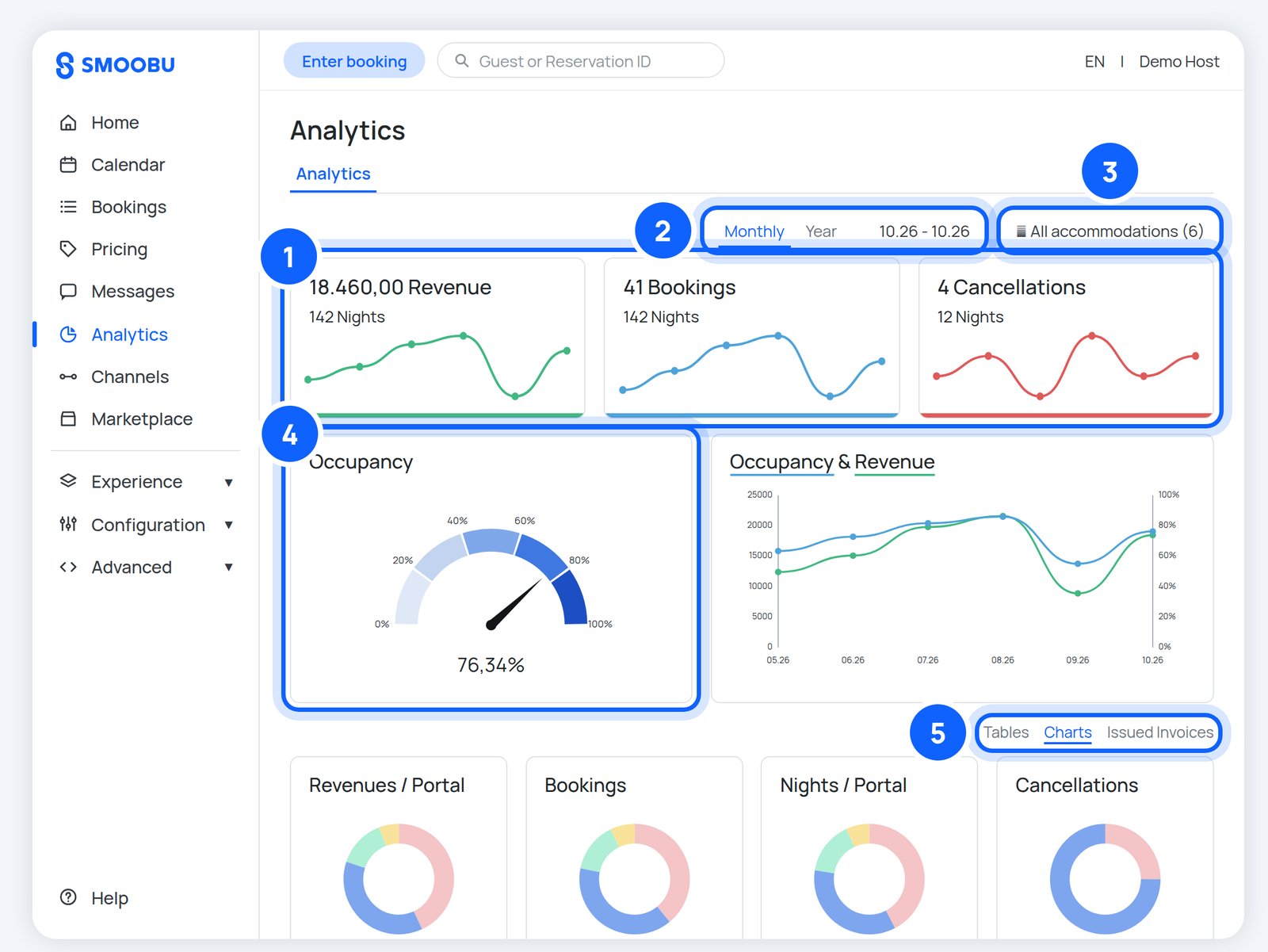
Smoobu Analytics brings your performance across all your properties and channels into one place, for any date range you choose. As of November 2026, the top three cards show Revenue, Bookings, and Cancellations, each with its nights underneath, and a gauge shows your Occupancy.
Below them, the Occupancy & Revenue chart shows how each month went. Further down, the Charts view breaks down revenue, bookings, nights, and cancellations by channel, and the Tables view shows the figures in sortable tables.
The filters at the top (Monthly or Year, the date range, and All accommodations) update all figures at once, so you can view your whole portfolio or one property at a time.
Two useful numbers aren't shown directly, but you can work them out in seconds:
- Average revenue per night: Revenue divided by Nights
- Average length of stay: Nights divided by Bookings
One thing to keep in mind: this revenue is gross. It's the full value of each booking, including any commission the channel keeps, so it will be higher than your payouts. That's fine for spotting trends, as long as you compare like with like.
The 5 Monthly Decisions and What They Pay Off
Each decision below follows the same pattern: the number to look at, the decision it points to, and what that decision sets in motion. Make one decision per area each month, then check its effect the following month.
1. Price Your Busy and Quiet Periods Differently
What to look at: occupancy and average revenue per night, month by month, in the Occupancy & Revenue chart. Set the date range to the same months last year to see which periods filled up early and which stayed half empty.
The decision: raise prices for the periods that sold out at your current rate, and lower them, or add a stay discount, for the periods that didn't. Make the change now for the same period ahead, while guests still have time to book.
The knock-on effect: price is one of the factors Airbnb uses to rank listings.
According to Airbnb's explanation of how search results work, listings priced below comparable listings in the area tend to rank higher, and adding open dates may improve visibility. A sharper price helps you show up when demand is low.
The payoff later: peak nights stop being sold too cheaply, and quiet nights stop sitting empty. If you'd rather not adjust prices by hand every month, Smoobu Dynamic Pricing raises and lowers your nightly rates with demand, within the minimum and maximum prices you set.
2. Set Minimum Stays That Cut Turnovers
What to look at: your average length of stay (Nights divided by Bookings), by month. Short average stays in busy months often mean you're doing a full changeover for one or two nights at a time.
The decision: raise the minimum stay for your busiest periods, and offer a discount for longer stays in quiet ones.
On Airbnb, hosts can set weekly and monthly discounts for stays of 7 or more and 28 or more nights, and discounts of 10% or more are shown in search results.
The knock-on effect: every turnover you avoid means no cleaning, laundry run, check-in, or check-out to organize. Fewer changeovers also leave more time to prepare each stay properly.
The payoff later: lower running costs and fewer rushed turnovers, which leaves less room for small mistakes before a guest arrives. Over a season, that adds up to real hours back in your week.
3. Put Your Effort Into the Channels That Work
What to look at: revenue and nights by channel in the Charts view (Revenues / Portal and Nights / Portal). Then compare each channel with its own payout report, because the revenue shown is gross and each channel keeps a different commission.
The decision: decide where to put your effort next month. That might mean improving your listing on the channel that brings most of your bookings, or turning past guests into direct bookings through your own Booking Engine instead of relying on one platform.
The knock-on effect: direct bookings don't carry a booking platform's commission. Smoobu charges no booking commission on the Professional Pre-Paid and Teams Pro+ plans, 0.9% per booking on Professional Flex, and payment providers like Stripe or PayPal charge their own fees.
The payoff later: you keep more of each booking's value, and a change on one platform hurts less when your bookings come from several places.
4. Tune Your Cancellation Policy
What to look at: the Cancellations figure next to Bookings for the same month. If cancellations are climbing, export your bookings list with the Canceled status switched on to see which channels and which booking windows they come from.
The decision: review your cancellation policy channel by channel. On Airbnb, for example, hosts choose from standard cancellation policies (Flexible, Moderate, Limited, or Firm for stays under 28 nights) and can also offer a discounted non-refundable rate.
The knock-on effect: fewer late cancellations mean fewer gaps that are too close to fill. A stricter policy can also put some guests off, so change one thing at a time and watch the next month's bookings before you change another.
The payoff later: a calendar you can trust. Steadier bookings make it easier to plan cleaners, maintenance, and your own time off, and to know what the coming months will bring in.
5. Fix One Thing at Your Weakest Property
What to look at: each property on its own, using the All accommodations filter. Compare its occupancy and average revenue per night with your other properties. For a single property, compare this month with the same month last year.
The decision: pick one fix for the property that's falling behind. Common candidates are outdated photos, a thin description, a missing amenity guests ask about, or a recurring problem your reviews keep mentioning.
The knock-on effect: Airbnb says listing quality affects ranking, including photos, ratings, and reviews, and that higher-quality listings with better ratings and reviews tend to rank higher. Better listings and better stays lead to better reviews, and better reviews lead to more visibility.
The payoff later: unlike a price change, this one keeps working. Each good review builds on the last, so a fix you make this month can still bring in bookings next year.
Want to try this with your own numbers? Try Smoobu free for 14 days and run your first monthly review.
What a Year of Monthly Decisions Adds Up To
The real benefit of a monthly review shows up after a few months, when the decisions start feeding each other. A better price fills more nights, more stays bring more reviews, and better reviews make it easier to charge a higher price next time.
Here's what that looks like in practice. The figures below are hypothetical examples to show how small changes add up, not averages or promises.
- Money: say your review shows eight nights a month that consistently sell out at €120. Raising them to €130 brings in €80 more a month, or €960 over a year, from nights you were already selling.
- Time: say you have 24 booked nights a month and an average stay of two nights. That's 12 turnovers. Lift the average to three nights, and it's eight turnovers: four fewer cleanings a month, 48 fewer over a year.
- Reviews: calmer changeovers and a fixed listing mean guests arrive as expected. That kind of stay earns good reviews, and good reviews support your ranking long after the stay.
- Predictability: a cancellation policy that fits your guests means fewer surprises, so you can plan cleaners, repairs, and your own time with more confidence.
- Better data: after a year, every month has a same-month-last-year to compare with. Your decisions get sharper because you can see what last year's changes actually did.
None of these depend on a big project. They come from a regular monthly habit: looking at the same numbers and making one decision on each.
Common Mistakes When Reading Your Numbers
The numbers are only as useful as the way you read them. These mistakes most often lead to the wrong decision.
- Treating revenue as income: Analytics revenue is gross. For channel bookings, it includes the channel's commission and, for imported bookings, the cleaning fee and tourist tax, so it's always higher than what reaches your bank.
- Comparing different periods: a quiet November next to a busy July tells you about seasons, not about your decisions. Compare a month with the same month last year.
- Reacting to one month: one weak month can be a holiday shift or a single long cancellation. Look for the same signal for two months in a row before making a big change.
- Changing everything at once: if you change price, minimum stay, and cancellation policy in the same month, you won't know which one worked.
Smoobu Pro Tip: Keep a simple spreadsheet with one row per month: your five figures from Analytics, plus one line describing the decision you made. At your next review, check last month's decision before you look at anything else.
How to Run Your Monthly Review in Smoobu
Once you've done it a couple of times, the review becomes a quick routine. Here are the steps, and the Help Center explains each figure in detail to help you understand your revenue and payment figures in Analytics.
- Open Analytics and set the Date range to last month.
- Leave All accommodations selected and note the figures at the top: Revenue, Bookings, and Cancellations with their nights, plus Occupancy.
- Work out two numbers: Revenue divided by Nights, and Nights divided by Bookings.
- Check the Charts view to see revenue and nights by channel, and the Occupancy & Revenue chart for the month-by-month trend.
- Change the Date range to the same month last year and note the same figures.
- Switch All accommodations to each property in turn to find the one that's falling behind.
- Write down your five decisions, one line each, next to the numbers.
Analytics tables can't be exported or copied, so note the figures by hand. When you need booking-by-booking detail, such as which channel your cancellations came from, export your bookings list instead and switch on the statuses you need.
Then act on each decision where it lives: prices and minimum stays in your rates, direct bookings through the Booking Engine, and fewer surprises for guests with Guest Communication messages that confirm the details before arrival.
Frequently Asked Questions
Once a month works best for most hosts. Daily checks mostly show noise, while yearly checks come too late to change anything. A monthly review is long enough to show a trend and leaves time to act on the months ahead.
Smoobu shows gross revenue: the full value of each booking, including the channel's commission. For imported bookings, it also includes the cleaning fee and tourist tax. To see what you actually received, compare it with each channel's payout report.
Divide Revenue by Nights for the same date range in Analytics. Because the revenue is gross, the result is your average gross revenue per night. This is ideal for comparing months and properties.
You can't export or copy the Analytics tables, so note the figures you need by hand. For booking-by-booking detail, export your bookings list instead and switch on the statuses you need, such as Canceled.
Yes. Instead of comparing properties, compare each month with the same month last year. Pricing, minimum stays, channel mix, and your cancellation policy matter just as much for one property as for ten.
Summary: Make Your Numbers Work for You With Smoobu
Vacation rental analytics pay off when each month ends with five small decisions: prices, minimum stays, channels, cancellations, and your weakest property. Made consistently, those decisions add up to more revenue, better reviews, fewer turnovers, and a calendar you can plan around.
Ready to turn your numbers into decisions? Start your 14-day free trial of Smoobu today.